
DashboardCar rental back office dashboard Coming soon
Keyring
Car rental back office with a drag-and-drop reservations planner, check-out and check-in with a damage diagram, fleet, maintenance and branches.
More screenshots
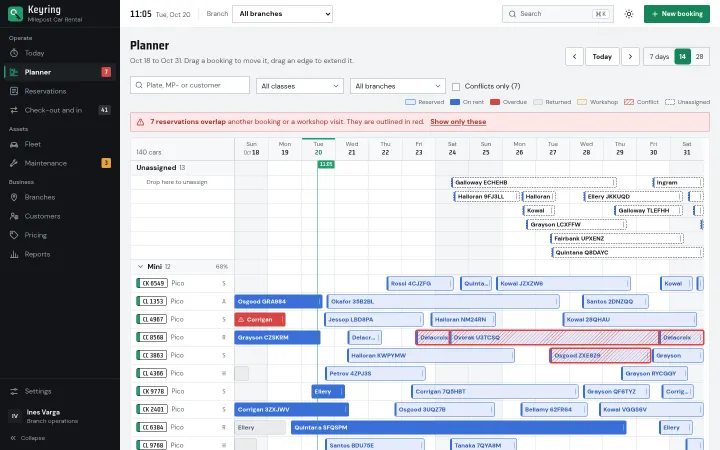
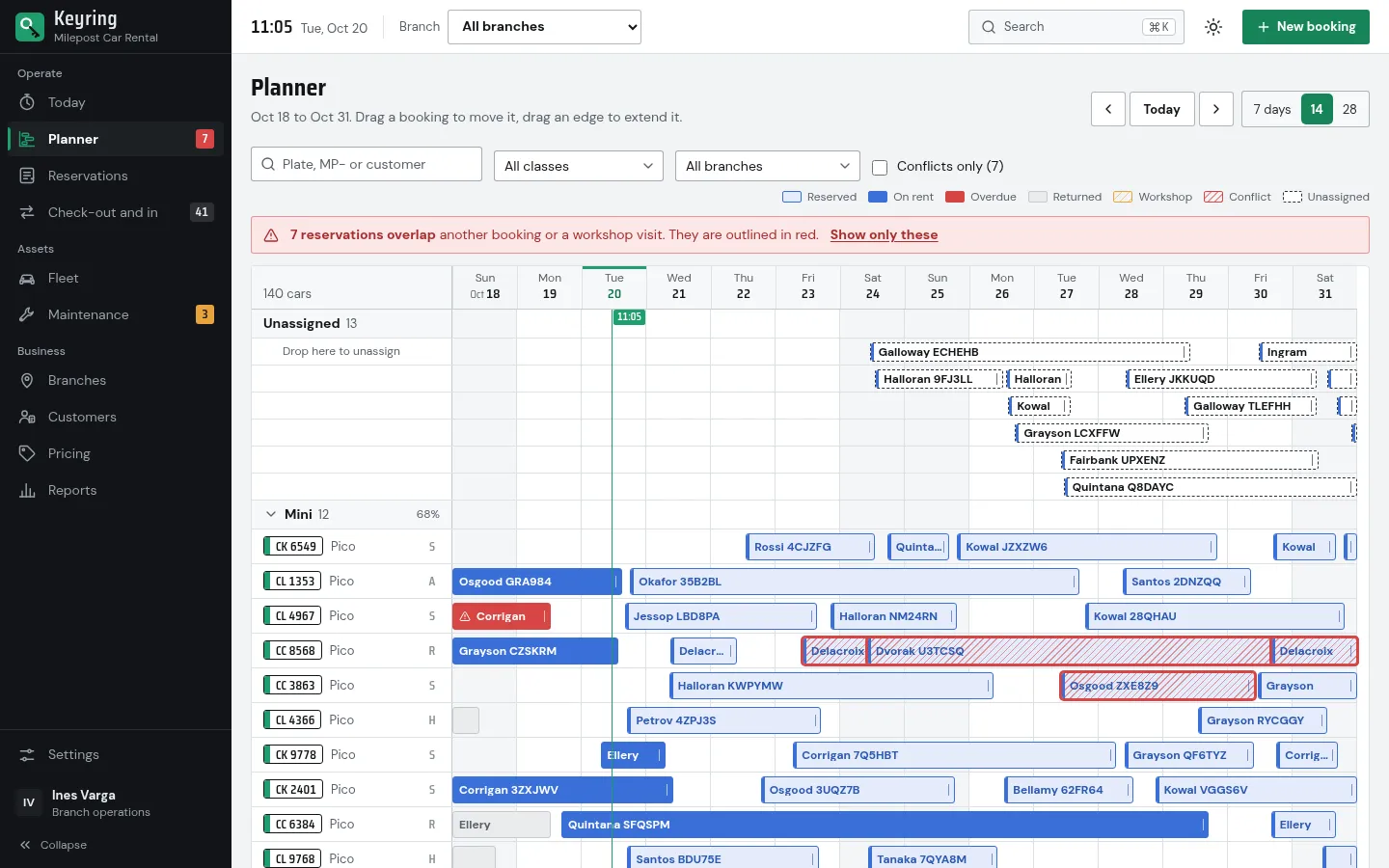
Reservations planner with drag, extend and conflict flags 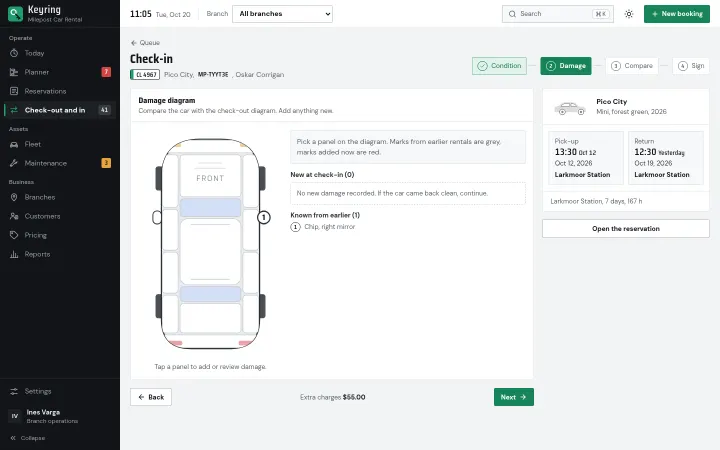
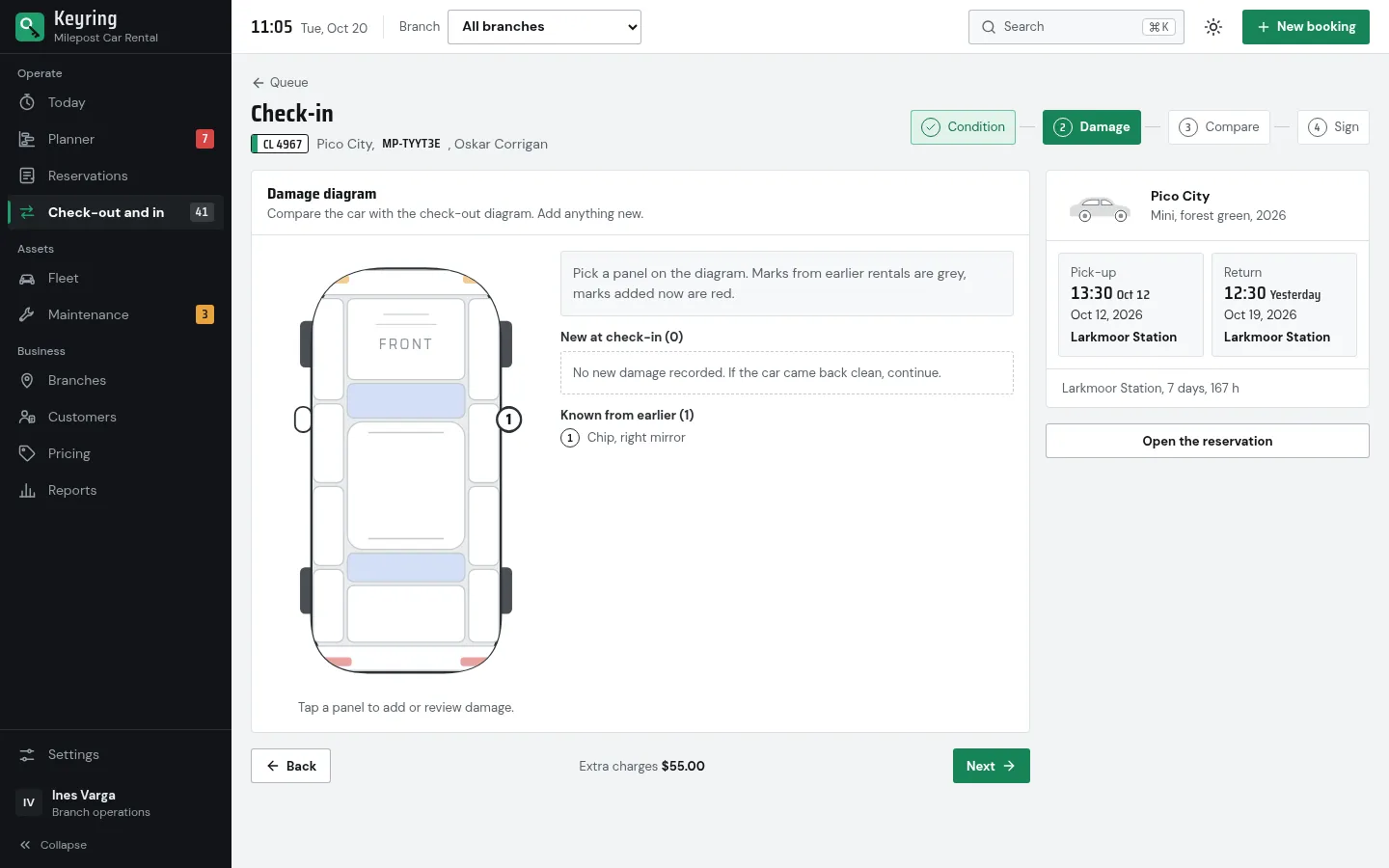
Check-in: damage diagram with marks from earlier rentals 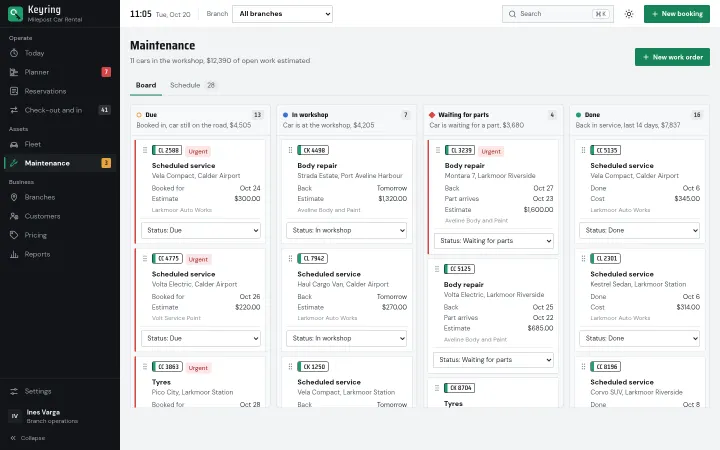
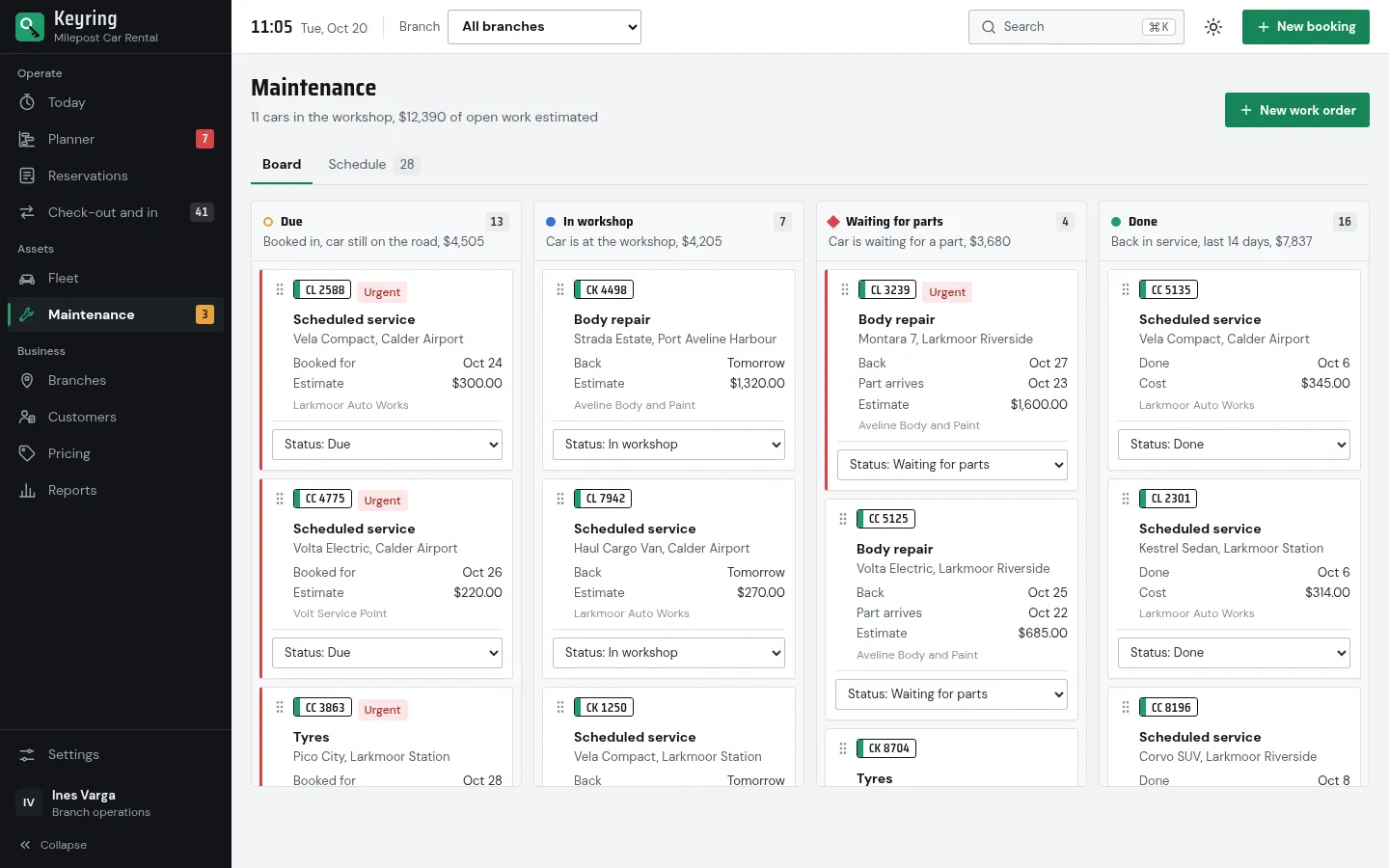
Maintenance board from due to back in service 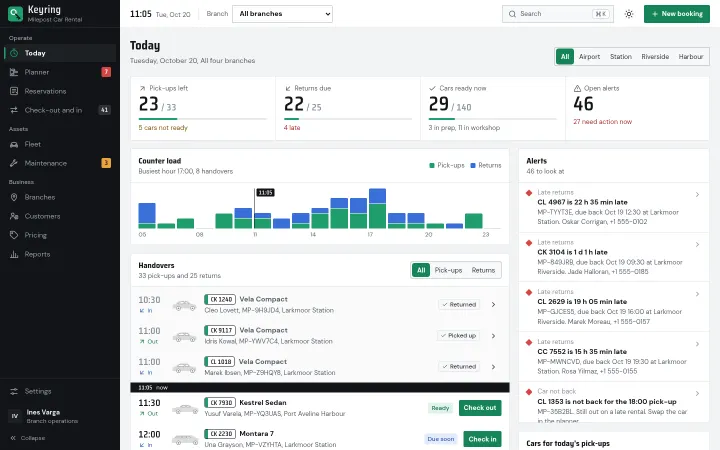
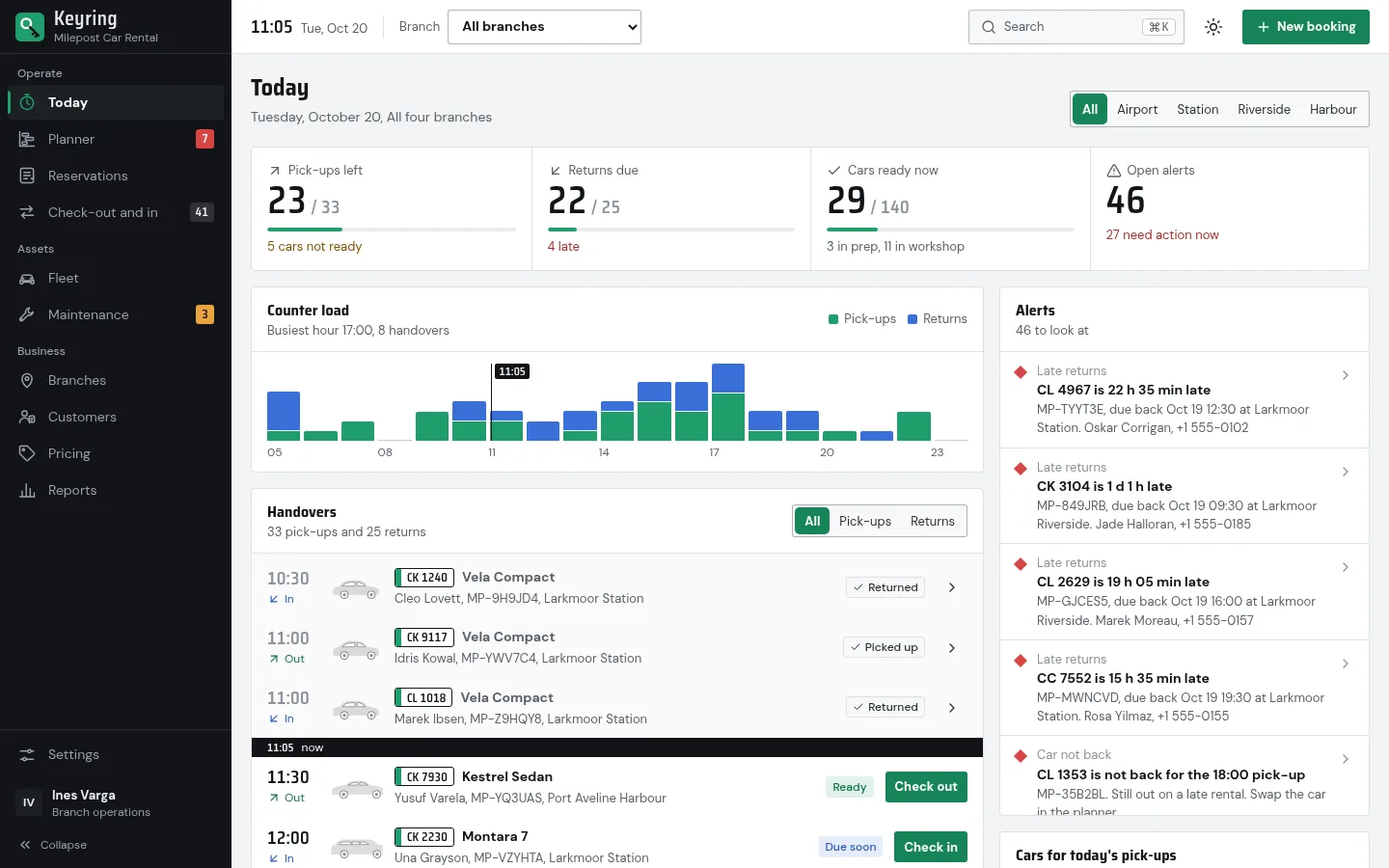
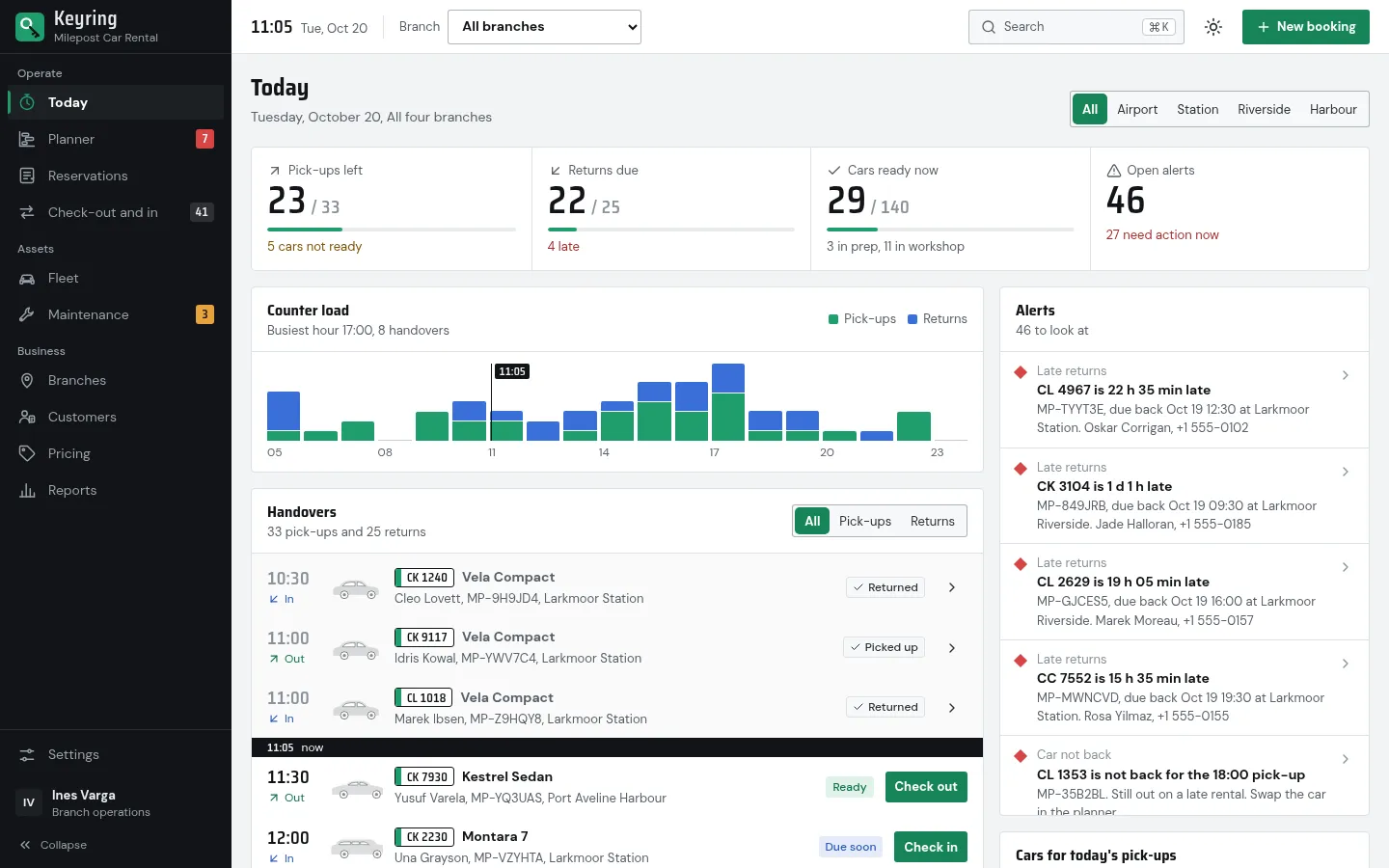
Today: counter load, handovers and alerts
About Keyring
The back office of an independent car rental company, shown as the fictional Milepost Car Rental with four branches, nine vehicle classes, 140 cars and about 190 customers around a frozen clock. A reservations planner of every car by day, with drag to move and extend, an unassigned lane and conflicts flagged in red; a counter queue and a four-step check-out and check-in with fuel or charge level, mileage, a top-down damage diagram, a comparison with the check-out and a signature, adding late return, fuel, cleaning and damage charges as it goes; fleet with service and document expiry, a maintenance board, branches with one-way trips and transfers, customers with licence checks and a blocklist, pricing and reports. The back-office pair of Milepost. React 19, TypeScript and Tailwind CSS 4, light and dark, 4 palettes.
Best for independent car and van rental companies, rental franchise operators, fleet managers and the teams building rental or fleet software.
Features
Reservations planner
Every car by day, grouped by class, with a lane for bookings without a car. Drag a reserved booking to move it in time or to another car, drag either edge to extend it, in 30-minute steps; on-rent bookings can only be extended. A move that overlaps another booking or a workshop visit is kept but outlined in red, with a toast and Undo.
Check-out and check-in
A counter queue for the day and a four-step flow on each side: licence check and card hold, fuel or charge level and odometer, the damage diagram, then the signature at check-out; condition, damage, a comparison with the check-out and the signature at check-in. Big touch targets, usable on a tablet or a phone.
Damage diagram
A top-down drawing of the car with 21 panels. Tap a panel to add a mark with its type, severity and note; marks from earlier rentals stay grey, new ones turn red, with a repair estimate per mark.
Extra charges
Late return at the rental rate, a different return branch, refuel or charging, cleaning and damage, which follows the protection plan: uncovered panels in full, covered ones up to the deductible, plus an administration fee. Prepaid fuel waives the fuel line.
Today
Pick-ups and returns left, cars ready, counter load by hour, the day's handovers and alerts such as late returns or a car not back in time for its next pick-up, for one branch or all four.
Fleet and maintenance
140 vehicles with status, fuel, odometer, next service and document expiry, a page per car with its calendar, service history and reservations, and a maintenance board (due, in workshop, waiting for parts, done) moved by drag or a status menu; workshop dates block the car in the planner.
Branches, customers, pricing
A network view of one-way trips, staff, cars on site and transfers between branches; customers with licence checks and a blocklist; rates by class with seasons, rules, protection plans, extras and promo codes from the Milepost catalogue.
Reports
Revenue by week, class and branch, fleet utilisation per day and per class, and damage cost by panel against what was charged, all computed from the same bookings and check-ins.
4 palettes + dark mode
Signal, Cobalt, Graphite and Copper, in light, dark (meant for night counter shifts) or system mode. Status colours keep their meaning in every palette. Drawn SVG cars, no stock photos.
What's included
- Today
- Reservations planner
- Reservations list
- Reservation detail
- Check-out and check-in queue
- Check-out and check-in flow
- Fleet
- Vehicle page
- Maintenance (board and schedule)
- Branches and transfers
- Customers
- Pricing
- Reports
- Settings
- Marketing landing page
- Sign-in page
- 404 page
Tech stack and fit
Built with
- React 19
- TypeScript
- Vite 7
- Tailwind CSS 4
- Recharts 3
- React Router 7
Who it's for
Independent car and van rental companies, rental franchise operators, fleet managers and the teams building rental or fleet software.
Pairs well with
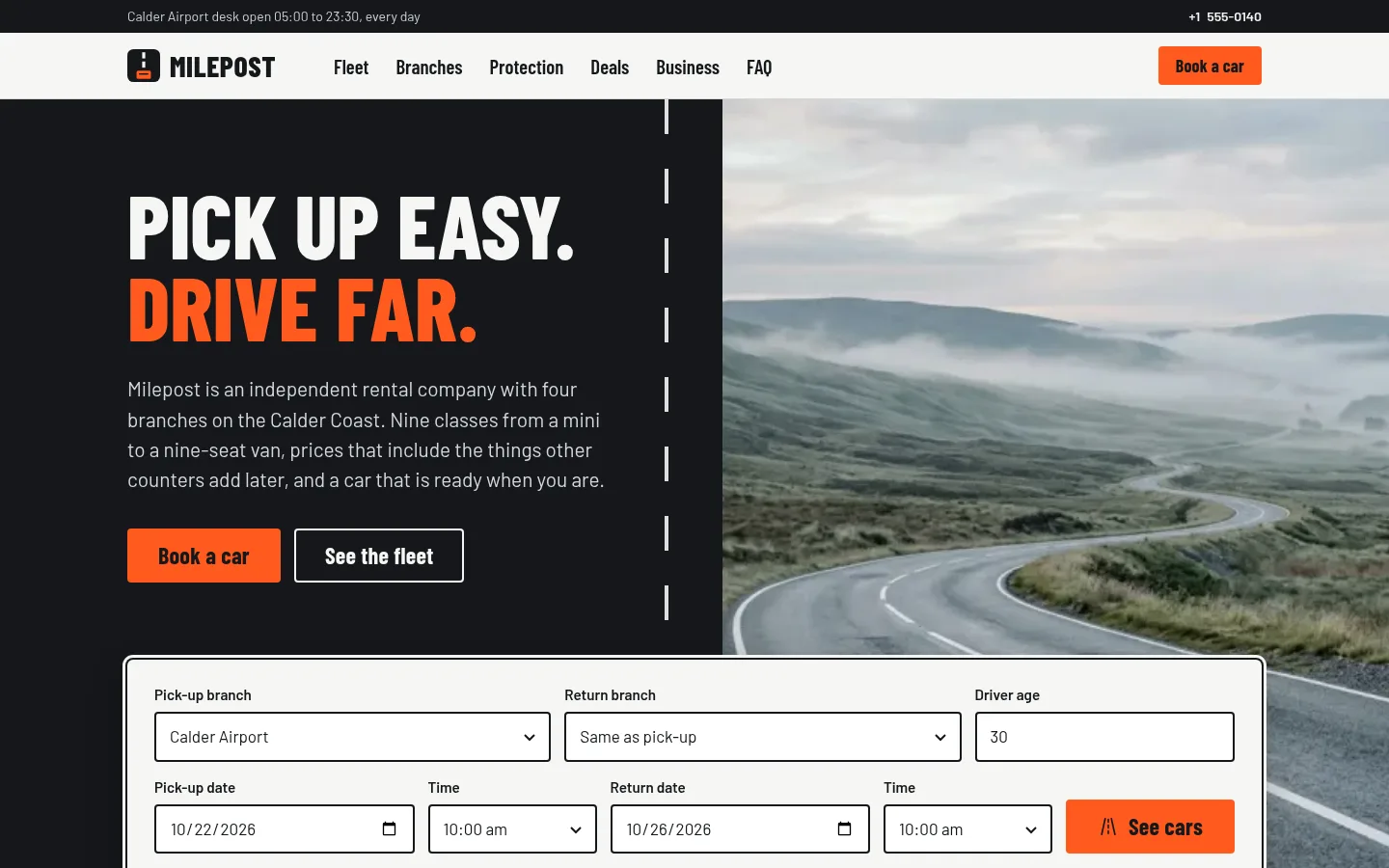
Built around the same kind of business, so the back office and the public site can share one brand.
Tags
Keyring FAQ
Is there a backend?
No. Cars, customers, bookings, handovers, work orders and transfers are generated from a fixed seed in src/data/generate.ts around a frozen clock (20 October 2026, 11:05) in src/data/clock.ts, so every count on Today matches the rows beneath it. The mutable state lives in OpsProvider (src/context/OpsContext.tsx): replace its initial data with your API and put your calls in actions such as moveReservation, createReservation, saveHandover, patchCustomer and addTransfer.
What happens when two bookings clash in the planner?
The move is kept but flagged: the bar gets a red outline, a toast offers Undo, and a banner counts every reservation that overlaps another booking or a workshop visit, with a filter to show only those. Reserved bookings can change dates and car, on-rent bookings can only be extended, returned and cancelled ones are fixed.
Can the planner be used without a mouse or on a tablet?
Yes. Tab to a booking, press M to move it, use the arrows to change day and car, Shift with the arrows to resize, Enter to confirm and Esc to cancel. On touch screens you open the booking and use Extend one day or Allocate car.
How are the check-in charges calculated?
One function, computeCharges in src/lib/charges.ts: extra days for a late return beyond the grace period, the one-way fee difference for another return branch, fuel by the litre plus a service fee or charging per 10 points, cleaning, and damage according to the protection plan's cover and deductible plus an administration fee. The amounts are in src/config/ops.ts, and the same function feeds the reports.
Does Keyring match the Milepost website?
Yes. It is the back office of the same fictional company: the same four branches, nine classes and models, protection plans, extras, deals and pricing engine, copied from Milepost into src/data/catalog, src/config/rules.ts and src/lib/pricing.ts. There is no code dependency, and each template is sold separately.
Are damage photos and signatures stored?
No. The photo button only counts placeholders per mark and the signature pad keeps a PNG data URL in memory. Wire the photo button to a file input or the camera, and send both to your storage when the handover is saved.
Is there a dark mode?
Yes. Light, dark or system, plus four accent palettes (Signal, Cobalt, Graphite, Copper) remembered in the browser. Status colours stay fixed: green available, amber due or in maintenance, red damage or overdue, blue reserved or on rent.
When can I buy Keyring?
Keyring is coming soon: the live demo is online, and it goes on sale on Gumroad shortly at $39 USD, a one-time purchase with free updates.
Can I use Keyring for a client project?
Yes. The license covers personal and commercial projects, including client work. Reselling or redistributing the template itself is not allowed.
Related templates
Close in purpose or features to Keyring. Browse all 38 templates.
Keyring is coming soon. The whole demo is already online.